Your Start-Up’s IT Made Simple

pexels-photo-65543

While you may have gotten away with starting a business with absolutely no IT a few decades ago, this certainly isn’t an option today! Now, if a business has no social media presence, or the apparatus to keep connected with important customers and clients, they might as well not exist! Seen as you’ve been planning to start a business for some time now, you probably know full well how many different processes are going to depend on IT. What you may not be so familiar with is how to actually set it all up. Here’s a guide to setting up the IT department at your first business.

We’ll start this off with the basic components you need for a functional IT department. In any modern business, computers are the workhorses which make everything tick. Each employee, apart from the janitorial staff and other manual workers, is probably going to need their own computers. Unless you want to put yourself through all the headaches that come with setting up an apparatus of Linux computers, then you’ll have two practical choices: macs and PCs. PCs are probably the most practical choice, as more of your employees will be familiar with them, and they tend to be more compatible with the commercial software you’re going to need. They’ll also be more affordable to buy in large quantities. Having said that, if your business happens to deal with sound production, graphic design, or other creative tasks, then a Mac may be the better option. You’ll have to think carefully about how many desktops and laptops you’ll need as well.

startup-photos-1

Desktops are the more cost-effective option by far, however, there’s some extra flexibility with laptops. For example, if you have employees who frequently need to meet suppliers or work remotely, they’ll need to have a laptop or a tablet with the same kind of compatibility. While you may be tempted to buy low-end or entry-level models, it’s almost always a more cost-effective option to go with mid-range computers. More complex tasks can require more sophisticated computers, so make sure you’re taking this into account too. Choose the largest monitors and most comfortable mice you can realistically afford. Remember that it’s 2016. Don’t be too stuck in your ways, and consider employing BYOD policies and making room for mobile devices in other ways. This can save you a small fortune in the long run!

The other big side to your hardware is accessories like printers, scanners and so on. Modern laser printers are both quick and reliable, meaning you won’t need to deal with any irritating queues when everyone’s on the printer’s network. Just make sure you’re reading a lot of reviews and doing some maths relating to the running costs. Once you use this apparatus for a long enough time, the running costs can seriously outweigh the initial purchase price. If you’re going to need a scanner or copier in the office, then be sure to consider getting an all-in-one machine. This will allow you to print, scan and copy from one place, while saving you a massive chunk of money compared to buying them all separately. When you’re drawing up your list, make sure you’re not missing out on any hardware you might need. Some businesses, even B2B firms, may need to use a point-of-sale device here and there. Obviously, it’s your business, and you’ll know the kinds of hardware you need better than I do. Whatever you go with though, it’s important to look into some support or managed IT services. I don’t have to tell you how frustrating and chaotic it is when a fledgling start-up’s whole system crashes!

The next big category you need to think about is software. At the very least, you should have Microsoft Office on all the computers your employees are going to be using. They’re likely to be familiar with its programs, and you’ll ensure a certain degree of compatibility when you’re sending files to partners and clients. Many software vendors offer considerable discounts when you buy several copies in bulk, so be sure to explore your options here. Another integral part of your IT infrastructure is going to be accounting software. There are countless examples of accounting software out there today, which will make your financial responsibilities so much easier. You’ll be able to set yourself reminders for taking care of important tax processes, and save some money on a commercial accountant. Many of these programs come with features for managing your payroll, which can be a load off if you’re used to doing it manually. A CRM system will also simplify your correspondence with customers and clients, and ensure that all your orders are being fulfilled on time. Like your hardware, it’s also important to make some room for mobile tech. There are a lot of office packages that bundle in mobile versions of common programs these days, so consider this is a possibility.
15093647697_a207f59008_z

Photo credit: David Santaolalla

Next we have cloud computing. This is related to, but not strictly a part of your business’s software. More and more, we’re seeing various business functions being switched over to the cloud, saving businesses massive amounts of time and money. By sourcing the right cloud computing systems, you’ll be able to get the IT system you need, while keeping your initial technology expenses nice and low. If you weren’t already aware, cloud programs allow you to sign in to a service online, rather than buying software to be installed on everyone’s computers. Furthermore, you’ll usually be charged a monthly fee rather than having to pay a hefty one-off cost for the program. The overall capital a business will spend on cloud computing as opposed to traditional software usually works out pretty much the same. However, it will be much less of a strain on your business’s finances if you only have to worry about monthly payments. Another prominent benefit of cloud software is that it’s not tied to any one computer, unlike a lot of traditional software. You can access them from any compatible device, provided you have the right credentials. It’s also very flexible in the way that you can crank the capacity up or down pretty much as you want to. This means that you won’t have a problem when a new employee joins, and that you won’t be stuck paying too much if someone leaves.

You’ll find that a lot of the cloud packages available to you come with dedicated support and maintenance, too. I probably don’t have to tell you how frustrating it can be to deal with the tech support from most traditional software, or having to hire in an unprofessional or inexperienced third-party service. By choosing the cloud, you’ll be able to relieve some of the burden of setting up a new IT department. Help will be at hand when you need it, and all the updates and security patches will be taken care of without you having to worry about it.

13334048894_001d3e53d1_z

Photo credit Yuri Samoilov

The final point I’ll touch on, which is just as important as any of the others, is your IT security. No matter what kind of business you’re running, the information you’re going to keep on your computers is going to be exceedingly valuable. You need to be taking all the steps you can to ensure that you don’t lose any of it. Whether your data loss comes from intentional attacks, like hacking or malware, or accidental things like a technical failure or human error, data loss should be avoided at all costs!

When you’re first planning out your network, try to think about security at every last turn. Make sure that strong passwords are part of the system from the very start. You may want to use an authenticator for those accounts which you really can’t afford to compromise. Firewalls will add an extra layer between your company’s IT system and cyber-attacks. You’d also do well to look into encryption, which will protect any of your data that’s being transmitted online or wirelessly within your office. General virus protection software is the very least you can have – on every last device at your business. Remember to get packages that are designed for commercial use though, rather than home computers. The most dangerous hackers care a lot more about business’s data than they do about getting into private computers.

Finally, ensure you’re operating with an airtight backup system. Every modern business should have a routine for backing up all their important data, and never let it slide. You should be keeping at least one backup file set off-site and protected from both technical issues and the elements. There are various cloud solutions for this these days, so start browsing! Of course, most of the security measures you implement at your company will all be for nothing if your employees are too blasé about it. Take steps to ensure that every employee, both current and new, is aware of how damaging and costly a security breach has the potential to be. Implement a strict security policy, and firm reprimands for anyone who breaks it.


Strange Things That Can Affect the Popularity of Your Website

laptop-593673_640

People who create websites want them to be popular. This basically goes without saying. But the things that can affect your website’s popularity is definitely worth highlighting. Especially when there are a lot of factors you may not have even considered. Here are some of the strangest things that can affect your website’s popularity!

How long you’ve owned that domain

This is one of the most underrated factors when it comes to website development. Sure, a domain that was created a year ago won’t have automatic precedence over a six-month-old domain. But how long you’ve owned the domain isn’t necessarily how old the domain is. If there have been previous owners, then this can definitely result in changes to search engine rankings. Google isn’t too keen on a domain that has been “passed around” a lot.

10363854753_c7b7253622_z

Photo credit Medith IT

Of course, a change in domain ownership isn’t always going to negatively affect your popularity. Someone looking for the website that used that domain in the past will come across your website – that’s technically a free visitor!

HTML

You may not think that the HTML skeleton of your website would matter all that much. Of course, you know that it is important because it’s part of what dictates what appears on your website.

But clean, clear HTML and messy, undetailed HTML can produce the same front-end website. What your website code looks like won’t affect the visitor’s enjoyment much. But it will affect how well search engines can read your website! It’s vital that you understand exactly how HTML and search engines interact.

The location of your business or web host

Wait, what do web users care where you’re actually based? As long as it works the same way, people wouldn’t care all that much if the Facebook offices moved from, say, California to Fort Payne.

But, yet again, it’s not the front-end visitors you have to worry about. It’s the search engines! Your precise location in a city is relevant. Your proximity to other businesses is relevant. Where the searcher is in relation to where you are will also be taken into account. Google Possum, a recent update to its algorithms, have made it easier for smaller businesses in this regard.

8367839709_b69e8d365e_z

Photo credit Tammy Strobel

Content length

A lot of people are under the impression that really short videos and articles is the key to success. After all, don’t we live in a time where everyone has a really bad attention span? Well, actually, this isn’t really true. Both people and search engines have shown a preference for longer content as opposed to micro-content. Videos and articles that take around four to seven minutes to read or watch seem to be the most popular.

Spelling and grammar

Exactly how important this is is often disputed. It’s fair to say that not every website with atrocious spelling and grammar is severely penalized when it comes to popularity. But search engines aren’t particularly fond of it, and will take it into consideration if you don’t meet other quality criteria. Plus, people who are actually looking at your website are bound to be a little annoyed if you fail in this area!

From Your Door To Theirs: Perfecting The Service Elements Of Your Home Business

Launching a home-based business is an increasingly popular option for modern entrepreneurs. And it’s a particularly useful solution for those coping with disabilities or physical struggles. After all, working from home removes the issues connected to commuting.

That’s not to say this type of career is easy. You’ll still need to think about managing stress, and you’ll still be faced with ups and downs along the journey. But if you can keep your clients happy, then there’s nothing to stop you achieving great things.

Quite frankly, the service is almost as important as the products. Here’s how to handle those aspects like a pro.

marketing-942996_640

Payment

The importance of the transaction itself is something far too many small businesses overlook, but yours can be different. Losing customers because you haven’t created an accessible process would be a huge sin. Do not fall into the trap.

Your chosen payment gateways need to inspire trust from the customer while offering as many options as possible. For bigger purchases, you may want to look at using repayment credit plans too.

If the client cannot complete their purchase due to poor facilities, they will take their business elsewhere. It couldn’t be any clearer.

Correspondence

When operating a home-based business, human interactions are likely to be a rarity. Therefore, perfecting other forms of correspondence is vital. Not only will it produce a more professional atmosphere, but it’ll also keep your customer in the know.

In today’s climate, many of those items can be handled through email communication. However, there are times where traditional mail is needed. Visit https://www.checkomatic.com for more info on printed business envelopes and crucial paperwork.

Whether online or off, those documents will make organization far easier for both you and the customer. This can only be good news.

bicycle-668764_640

Delivery

As a home-based business, you might not even deal directly with your products. Whether you do or don’t, it’s imperative that they arrive at their destination in the best condition possible. If they reach the customer’s door in a bad way, you’ll probably never see their custom again.

You can go the extra mile by choosing eco-friendly packaging. Even if you don’t, ensuring that the deliveries are fast and effective is crucial for any small business. After all, the client should feel excitement when they see their product arrive. If the package is battered, it takes the shine off of the experience.

Apart from anything else, it will reduce the threat of returns.

After Care

Most successful home businesses thrive due to repeated custom rather than growing numbers. Once you have gained your audience, it’s imperative that you keep them happy. As such, you must ensure that your services after the sale are as brilliant as those before.

Do you have the resources to run a call center? Probably not. However, a virtual receptionist from https://www.callruby.com will soon solve that problem. If you’ve handled the other areas well, there’s a good chance that you won’t receive too many calls anyway. But knowing that you are ready to solve any issues will put a client’s mind at ease.

In turn, that should put many of your fears to bed too.

How to Take Great Photos that Promote Your Business

camera-1240256_1280If you want to promote your business either online or offline – great photos are a must. Both marketing as well as advertising are increasingly visual nowadays, and people will respond a lot better if you have some great photos to accompany your message.

Of course before you actually start to promote your business, you’ll have to snap some photos. That is something that many people find a lot easier said than done – but these steps should help you get off on the right foot:

  1. Identify the purpose and message of each photo

Every photo that you use to promote your business should have a particular purpose and message. For example, photos of products or services will be intended to showcase them and let customers see how good they are. It helps to know the purpose and message that you desire from your photos, as you can then plan the photos you need to snap accordingly.

  1. Make sure the ‘mood’ of the photo reflects the message

Once you know the message that your photo is going to convey, you should engineer it so that the mood of the photo reflects that. For example if the message is about being active then a photo that shows movement would match it well. Similarly if the message is more about being calm then a tranquil scenery might be a good fit.

  1. Be creative in how you convey the message

A little bit of creativity can go a long way and could help your photos to appear more unique while also attracting attention and interest. Needless to say this is going to be one area that is entirely subjective – but you should keep it in mind and try to brainstorm different ideas of how a particular message can be conveyed.

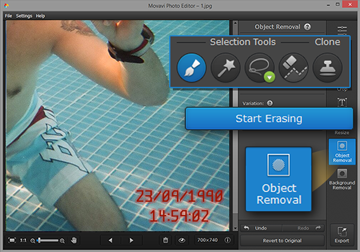
When you follow these steps you should be able to take some great photos that really give your business an edge in marketing or advertising. That being said you will also have to edit them to make sure they look good – and for that you should turn to Movavi Photo Editor.

2-en

All it will take is a bit of experimentation for you to learn how to remove text from a picture, enhance the photo quality, replace the background, apply artistic filters, or transform the frame and orientation with Movavi Photo Editor. That coupled with its many other features should give you the means to ensure your photos are able to convey the message you want – and look good when doing so.

Be sure to take a few minutes to try out Movavi Photo Editor. The sooner you start to use it and experiment with its features, the sooner you’ll be able to really create great photos to promote your business.

Forget Ad Impressions: This Is How You Build A Solid Reputation Online

It won’t surprise you to learn that your reputation is bound up in the conversations that people have about your business. If those conversations are good, you’ll fly and do plenty of business, no matter what the season. If they’re bad, you’ll struggle to make a lasting impact on your community.

light-bulbs-1125016_1280

Today, your reputation isn’t just confined to conversations people have in the physical world. It’s moved to the digital world, increasing the opportunities and also the perils. There’s never been a better time to spread the word about your business and enhance your reputation. You can communicate with thousands of people, all with a few clicks of the mouse. And you can reach people you would never ordinarily have been able to reach in the past. But with these new tools, there are also significant perils. Make mistakes, or get your PR wrong, and you could end up with a bad online reputation that’s hard to shift.

So with that said, what strategies can small businesses use to improve their reputation in the online space?

Step 1: Create Content That Demonstrates Your Expertise

Amy Cuddy is a social psychologist from Harvard University. When it comes to convincing customers that you are somebody that they can trust, she’s an expert. She says that the best way to build a good reputation is to gain the respect of your customers. When customers respect your abilities and understand your talents, they are far more likely to hand over their money. They want people who they can trust to deliver high-quality products, no matter what.

She advises small businesses not to focus on sales, but to push out informative and educational content instead. This is, in a sense, marketing by the back door. You provide customers with valuable information they would struggle to find elsewhere. And in the process, you build up a level of trust that then makes it more likely that they’ll come to you in the future.

Let’s say for instance that you’re a veg box company. People are constantly looking for easy ways to eat more healthily. You could demonstrate your expertise by finding healthy and tasty recipes and providing them for free on your site. You’ll then get lots of traffic from people looking to eat better, and in the process, some might sign up to your scheme.

Step 2: Engage With Your Customers Online

Cuddy says that people make two fundamental evaluations when they meet a new person. They first try to figure out whether they can trust them to do what it is that they want them to do. And secondly, they try to find out whether they are worthy of respect.

workplace-1245776_640

The same holds true for small businesses. People want to know whether they can both trust and respect a small business. Arguably, the best way to do this online is through customer engagement, specifically reviews. Reviews are a great vehicle to establish trust since people are more likely to trust their peers than they are your own marketing. And they’re an excellent vehicle for gaining respect. The more issues that you resolve, the more confidence your customers will have that you can deliver for them too.

Building reviews and engaging with customers online takes time. There are software solutions, like Chatmeter, for instance, that help to reduce this burden. But you’ll have to spend a proportion of your time managing your online relationships. Make sure that you check-in regularly on your social media channels using dashboard apps. Ensure that you’re pursuing likes and uploading fresh content for your followers to enjoy. The more activity that you can generate the more that Google will see this as a “brand signal.” The stronger your brand signal, the higher you’ll climb the rankings, and the more people will find you.

Step 3: Get Your Audience Chatting

Companies struggle to get people talking about them, often because they think that they have to always promote their product. And when your product is cut timber or scaffolding, that’s hard.

But the truth is that getting people talking about your business doesn’t require a focus on your product. Instead, you can create a buzz around an offer or an event. Perhaps everybody who turns up to your timber yard on Mondays can help themselves to a free slice of cake. Or maybe you’re doing a discount for people who wear charity stickers. Pick something that will get people talking and sharing. Discounts, events and prizes are all great ways to do this.

blog-608790_640

Another tactic is to do personal shout-outs to your customers. Whatever it is, it all helps to get people talking and Google to notice.

Step 4: Use Local Publications

Small businesses want backlinks from authority sites, like Forbes and Inc., more than anything else in the world. And while links from those locations will do a lot to boost your ranking, they’re not the only sites you could approach. Small businesses need to start locally before they move to the national stage. That’s why it’s worth contacting local press first, as a platform before moving onto the larger publications. Featuring in local publications will help your geo-search rankings. If you’re smart, you can also target publications directly related to your business. Through these publications, you stand a good chance of getting referral traffic to your site.

Step 5: Use Branding Rather Than Ad Conversions Or “Impressions”

There’s a debate running right now as to whether impressions really are a good metric to use when it comes to online advertising. Both large and small businesses have questioned their ability to improve your reputation and build a brand. The main problem is that it’s tough to measure the ROI of impressions. Sure, MIT researchers may have found that ad impressions stick in people’s minds after just 13 milliseconds. But there’s no real way to connect the impression to the final sale or conversion.

Banner ads are becoming an increasingly unpopular way for businesses to build the reputation or customer base. Instead, many are not turning to the very branding methods we’ve discussed in this article. Click through rates are poor performers compared to other types of digital outreach.


By continuing to use the site, you agree to the use of cookies. more information

The cookie settings on this website are set to "allow cookies" to give you the best browsing experience possible. If you continue to use this website without changing your cookie settings or you click "Accept" below then you are consenting to this.

Close